
Free PDF export
Save a full webpage screenshot as PDF — free
Turn any capture into a PDF on A4, Letter or Legal pages, or keep it as one long page. Ideal for sharing, printing and archiving exactly what a page looked like.
Launch statusBeing prepared for the Chrome Web Store. The install button will link to the store as soon as the listing is approved.
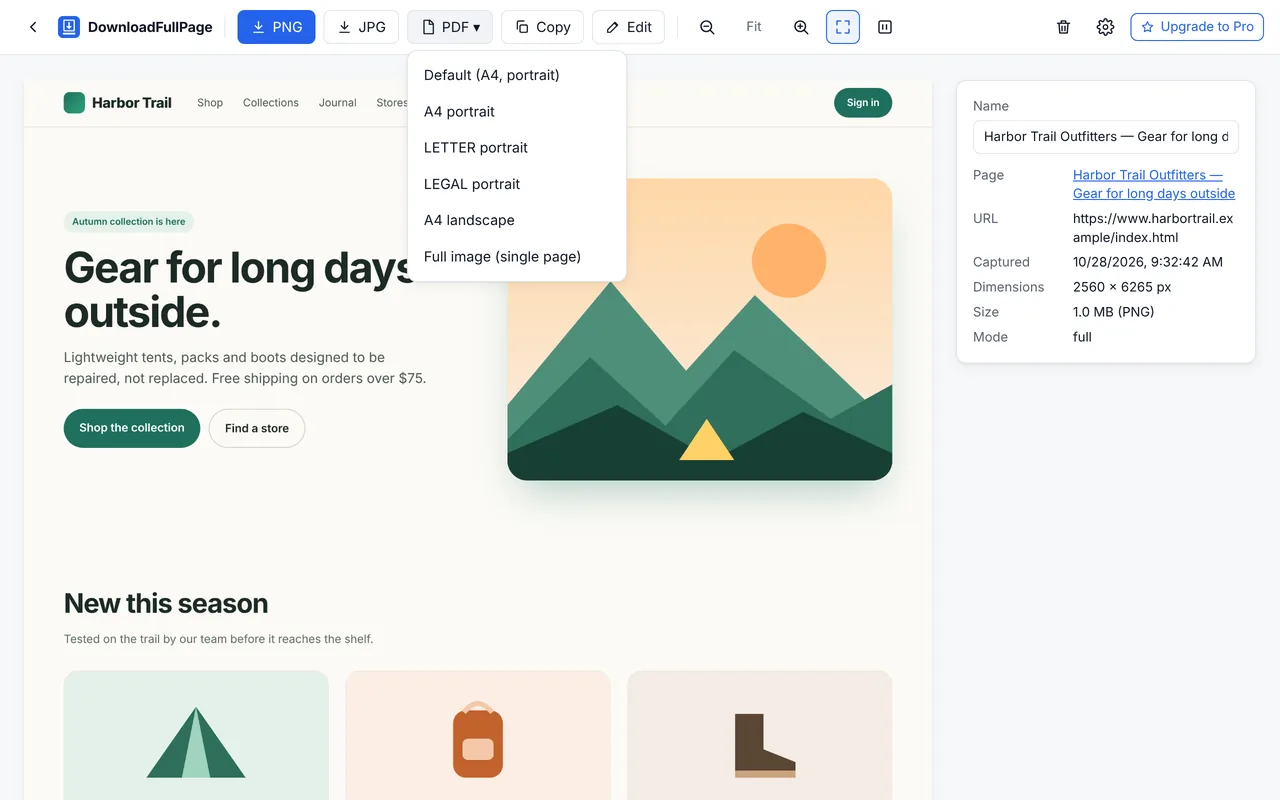
PDF options
| Option | Result |
|---|---|
| A4 / Letter / Legal, portrait | The screenshot is scaled to the page width and split across as many pages as needed |
| A4 landscape | Wider pages for dashboards and wide layouts |
| Full image (single page) | One long page, no page breaks (very tall captures continue on extra pages because of PDF size limits) |
| Default | Uses the paper size and orientation set in Settings |
Optional URL and date/time stamps (Settings › Export) are printed on the last page — useful for records and evidence of how a page looked.
Screenshot PDF or print PDF?
| Aspect | DownloadFullPage PDF | Chrome Print › Save as PDF |
|---|---|---|
| Looks exactly like the screen | Yes | Often not — sites use a separate print layout |
| Selectable / searchable text | No (image) | Yes |
| Annotations and blur | Yes, via the editor | No |
| Clickable links | No | Usually |
Steps
- Capture the page (Alt+Shift+D for full page).
- Optional: click Edit to highlight or blur, then export PDF from the editor.
- In the preview, open the PDF menu and choose a paper size.
- The file downloads with an automatic name such as
example.com-2026-10-28-093145.pdf.
Page breaks in the free version are placed at fixed page heights. Smarter breaks that avoid cutting through text are planned for Pro.
Questions
Can I save an entire webpage as a PDF for free?
Yes. After a full page capture, choose PDF in the preview and pick A4, Letter, Legal or a single long page. The PDF contains the screenshot as an image, so it looks exactly like the page but its text is not selectable. For a text-based PDF, use Chrome’s Print › Save as PDF instead. See screenshot to PDF.
How can I capture a long webpage as one image?
Use Capture Full Page. Pages up to about 16,000 pixels tall (after accounting for screen resolution) are saved as a single image; taller pages are saved in several parts automatically to stay within browser image limits. PDF export combines all parts into one document.
Which file formats are supported?
PNG (lossless), JPG (adjustable quality from 50% to 100%) and PDF (A4, Letter or Legal in portrait or landscape, or a single long page). You can also copy a screenshot to the clipboard.
Start capturing full webpages for free
Full page, visible area, region and element screenshots — with an editor and PNG, JPG and PDF downloads. No account needed.
Being prepared for the Chrome Web Store.